
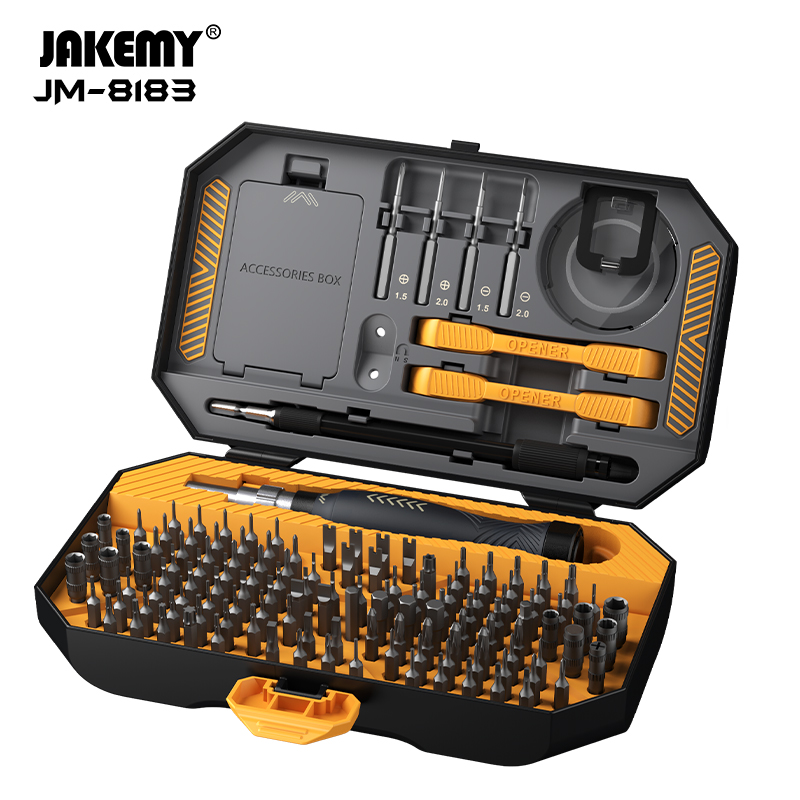
Precision repair depends on more than having a large collection of screwdriver bits. Technicians need to identify the correct fastener, reach it without damaging nearby components, and keep small parts organized throughout disassembly. These steps are particularly important when working with laptops, tablets, game consoles, and other compact electronics. At Jakemy, we designed the Jakemy JM-8183 as a 145-in-1 precision screwdriver set with a broad bit selection and supporting accessories. Understanding how to use each part effectively helps repair teams get more value from the kit and build a more consistent workflow.
1.Prepare the Device and Identify the Fasteners
Before opening a device, shut it down, disconnect its power supply, and follow the manufacturer’s repair instructions. For equipment with an internal battery, use the appropriate service procedure before accessing internal components. Keep screws from different stages of disassembly separate, since similar-looking fasteners may have different lengths or thread specifications.
Next, inspect the screw heads and select a matching bit. The JM-8183 includes multiple profiles, including Phillips, slotted, Torx, security Torx, hex, tri-wing, pentagon, triangle, and other types. This range supports different repair tasks, but it does not mean every bit is suitable for every device.
Choose a bit that fits fully into the recess with minimal movement. If the tip wobbles, sits unevenly, or slips under light pressure, check the size and profile again. Using the wrong bit can strip the screw head, turning a routine repair into a more difficult extraction job.
2.Choose the Right Bit for the Job
The JM-8183 contains 132 screwdriver bits within its 145-piece configuration. The official product specifications list 116 CR-V bits and four specialized 45 mm deep-hole bits made from S-2 chromium-molybdenum steel. The set also includes sockets and additional repair accessories.
When choosing a bit, start with the fastener rather than the device name. Two laptop models may use different screws in similar locations, so avoid assuming that a bit used successfully on one machine will fit another.
For a screwdriver set for laptop repair, bit identification is especially important because laptop assemblies can contain a mixture of fastener sizes and profiles. Check service documentation when available, and arrange removed screws so their original positions remain clear. This is a simple way to reduce reassembly errors.
The JM-8183 uses laser-engraved bit markings, helping users identify sizes from the labels. Returning bits to their designated positions after use also makes the next repair easier and helps teams notice missing components before starting another job.
3.Use the Extension for Recessed and Narrow Spaces
Some fasteners sit inside deep openings or in areas where a standard bit and handle are difficult to position. For these situations, the JM-8183 includes four 45 mm deep-hole bits and a handle with a built-in adjustable extension that can extend up to 50 mm. A separate 130 mm extension bar is also included.
To work in a recessed area, first check whether the screw head is accessible and whether the selected bit can reach it straight on. Extend the built-in bar when additional reach is useful, then position the tip carefully before turning. Keep the driver aligned with the screw axis to reduce sideways pressure.
The longer S-2 bits can help reach suitable deep-hole fasteners, while the separate extension bar offers another option for access. Neither accessory should be forced into a narrow opening. If the tool cannot align with the screw, reposition the device or choose a more suitable approach rather than applying extra torque.
4.Use the Accessories During Disassembly
Screws are only one part of electronics repair. Opening a device may also require lifting a panel, separating a housing, or handling small components. The JM-8183 includes a suction cup, two spudgers, five ultra-thin opening tools, tweezers, and an extension bar.
Use an opening tool that suits the material and construction of the device. Plastic opening tools can help separate appropriate housings while reducing the risk of scratching compared with unsuitable metal tools. A suction cup may help lift a compatible screen or smooth panel, but it should only be used where the surface and repair procedure permit it.
Tweezers can assist with handling small parts, while spudgers can help with suitable prying or positioning tasks. Work gradually, watch for concealed clips or cables, and stop if a component resists unexpected movement. The right accessory can improve access, but careful technique remains essential.
5.Maintain Control During Reassembly
After replacing a component, check that cables and connectors are correctly positioned and that no tools or loose screws remain inside the device. Refer to the service instructions to determine the correct screw locations and tightening requirements.
The JM-8183 handle features a 3D anti-slip texture and a rotating cap. These design elements support grip and controlled turning during precision work. Apply steady, appropriate pressure, and avoid overtightening small fasteners. If the manufacturer specifies a torque value or a particular fastening sequence, follow that guidance rather than relying on feel alone.
For repair businesses, a consistent process is valuable: organize screws during removal, inspect components before closing the device, and return every bit and accessory to its designated storage position when the job is complete.
Making the JM-8183 Work for Your Repair Workflow
The Jakemy JM-8183 combines a broad range of precision bits, deep-hole options, an adjustable handle extension, and accessories for device opening. These features make it a useful candidate for teams servicing laptops and other electronics, provided the included profiles match the fasteners encountered in their work.
At Jakemy, we also recognize that repair businesses and distributors evaluate tools differently from individual users. Teams may need to consider repeat-use workflows, storage, product specifications, and supply arrangements together. We offer OEM and ODM services, and business buyers can contact our team to confirm current minimum order quantities, sample availability, customization options, and lead times.
Ultimately, effective precision repair comes down to choosing the correct tool, using it with control, and following the device’s service procedure. With an organized workflow and the right bit selection, a Jakemy precision kit can help technicians approach routine disassembly and reassembly tasks more systematically.