
An electronics repair workstation needs more than a collection of screwdriver bits. Technicians must identify unfamiliar fasteners, open device housings without unnecessary damage, handle small components, and keep removed screws organized throughout the job. For repair businesses, an effective kit should support these steps without taking up excessive bench space or creating unnecessary inventory costs. At Jakemy, we approach kit selection by looking at the tasks technicians perform most often, the tools needed at each stage, and how easily those tools can be stored and replenished.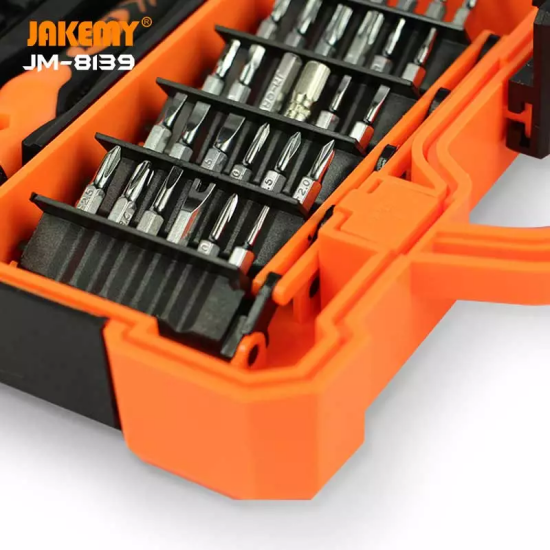
Start With the Devices Your Team Repairs
The first step in building an electronics screwdriver set is to identify the equipment your technicians handle regularly. Smartphone and tablet repairs may involve opening screens and removing compact internal screws. Laptop maintenance can require access to covers and internal assemblies, while camera, watch, and game-console repairs may involve smaller fasteners and limited working space.
These differences affect the bit types, opening tools, and accessories a kit should contain. A set designed for general electronics maintenance may cover common tasks, but teams working on specialized equipment should confirm the fastener requirements of the specific device models they service.
For B2B buyers, this task-based assessment also helps avoid purchasing tools that rarely leave the case. Repair chains can compare the work handled at different branches, while distributors can use customer feedback to decide which configurations deserve regular stock. The objective is not simply to choose the largest kit; it is to provide a useful range of tools for the work being performed.
Select Bit Variety and Material Carefully
Screwdriver bits are the working core of a precision repair kit. Different fastener profiles require corresponding bit shapes, and an incorrect fit can cause slipping, damage to the screw head, or delays during disassembly. Before ordering, check the bit types and sizes against the devices your customers repair most frequently.
The 47 in 1 screwdriver set JM-8139 from Jakemy combines precision screwdriver bits with tools for opening and handling electronic devices. Its listed configuration includes CR-V precision bits, a screwdriver handle with magnetic tips, an extension bar, a roller opening tool, a metal opening stick, a plastic triangle pry tool, a suction cup, curved-tip tweezers, a utility knife, and a SIM eject pin.
CR-V steel is used for the set’s precision bits. However, material alone does not determine whether a bit is suitable for every fastener. The profile, size, fit, and condition of the tip all matter. Technicians should seat the bit fully, keep it aligned with the screw, and apply controlled force rather than using a small precision driver as a lever.
Magnetic tips can help retain small screws during handling, although magnetic retention does not eliminate the need to keep removed fasteners organized. These details are especially relevant for workshops processing multiple devices in a single shift.
Include Tools for Opening and Component Handling
A repair kit should support the transition from loosening screws to accessing the device interior. Screwdrivers alone may not be sufficient when a technician needs to separate a cover, lift a screen, or handle a small component.
The JM-8139 includes several complementary opening tools. Its suction cup can help lift compatible smooth screens or covers, while the plastic triangle pry tool can help separate housing edges. The metal opening stick offers another option for suitable tasks, but technicians should assess the surface and component risks before using a metal tool near delicate finishes or internal parts. Curved-tip tweezers help with handling small components, and the SIM eject pin supports access to SIM trays.
These tools serve different purposes, so they should not be treated as interchangeable. Use the least aggressive suitable tool, follow the device manufacturer’s disassembly guidance, and avoid forcing a tool into a seam that does not open readily. For service businesses, consistent handling procedures can help reduce avoidable damage and make technician training more repeatable.
Design the Kit Around Workflow and Storage
A practical kit should keep frequently used tools accessible while making missing items easy to identify. When bits and accessories are scattered across a workbench, technicians may lose time searching for the right tool or accidentally mix screws from different devices.
JM-8139 comes with a compact toolbox that keeps the screwdriver and supporting accessories together. For repair teams, this format can support a more consistent workstation setup: return each tool to its designated place after use, inspect the contents between jobs, and separate fasteners by device during disassembly.
When standardizing kits across multiple locations, document the required contents and establish a simple inspection routine. This is particularly useful for businesses that move tools between benches or deploy technicians to different service locations. A consistent kit configuration also makes replacement purchasing easier because staff can report missing or damaged items against a known product model.
Evaluate Kits From a B2B Purchasing Perspective
For distributors, wholesalers, and repair-service operators, the right kit must work operationally as well as commercially. Consider the application range, included accessories, storage format, target customer, and expected order volume. A broader kit may be appropriate for service centers handling different device categories, while a more specialized configuration may suit a workshop with a narrow repair focus.
Our JM-8139 product page lists a minimum order quantity of 100 pieces and sample support. These details give business buyers a starting point for evaluating the product for distribution or workshop deployment. Before confirming a bulk order, check the current specification, packaging, availability, and delivery schedule with our team.
If you are comparing an electronics screwdriver set with other configurations, assess the complete workflow rather than counting bits alone. Opening tools, component-handling accessories, and storage can influence how useful a kit is in day-to-day service work.
Make the Kit Fit the Work
Building a practical repair kit means matching bit coverage, opening tools, handling accessories, and storage to the devices your team actually services. The JM-8139 brings these elements together in one compact set for common phone, computer, tablet, camera, and other small-device repair tasks.
At Jakemy, we encourage business buyers to begin with their customers’ repair requirements, confirm compatibility needs, and choose configurations that can be stocked and managed consistently. A well-matched Jakemy kit gives technicians a defined set of tools to work with and gives distributors a clearer basis for recommending products to different repair markets.