
Electronics repair often involves small screws, tightly fitted housings, delicate internal components, and tools that require careful handling. A minor mistake, such as using the wrong screwdriver bit or forcing an opening tool into a narrow gap, can damage a device or cause an avoidable injury. At Jakemy, we believe that choosing suitable tools is only part of a responsible repair process. Technicians also need consistent working habits, an organized workspace, and a clear understanding of what each accessory is designed to do.
Choose the Correct Bit Before Turning a Screw
Using an incorrectly sized screwdriver bit is a common source of fastener damage. If the tip does not fit the screw head securely, it may slip during rotation, damaging the recess or scratching nearby surfaces.
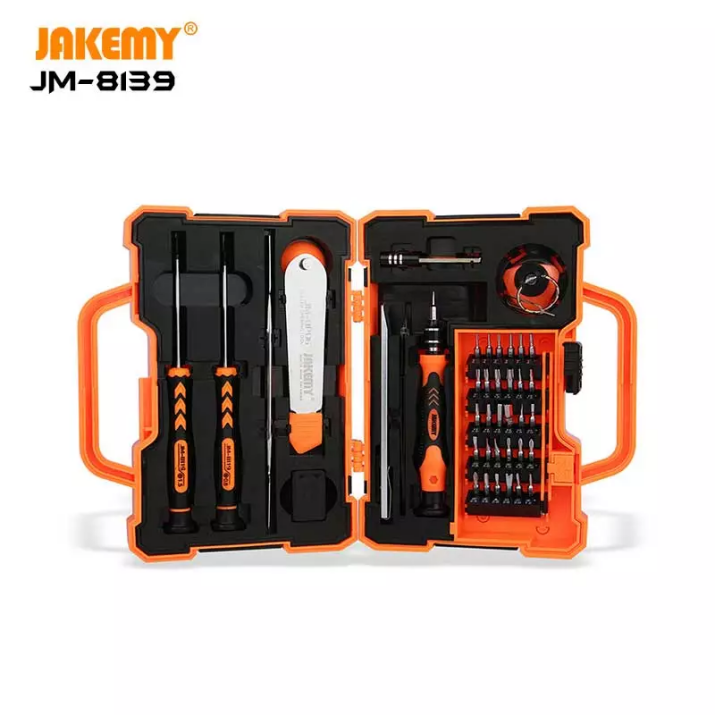
The Jakemy JM-8139 is a 47-in-1 electronics repair kit with a selection of CR-V precision screwdriver bits in different profiles, including Phillips, slotted, Torx, hex, and other specialized types. Before beginning a repair, identify the fastener and select the matching bit. Check that the tip sits securely in the screw head, then keep the driver aligned with the fastener as you turn it.
Avoid applying excessive force when a screw resists movement. Stop and inspect the fit instead of repeatedly attempting to turn it. For repair businesses, training technicians to check bit compatibility before use can help reduce damaged screws, rework, and unnecessary replacement costs.
Open Device Housings Without Applying Excessive Force
A device cover that does not separate easily may still be secured by clips, adhesive, or an overlooked fastener. Forcing a tool into the gap can damage the housing or internal components.
Our JM-8139 includes opening accessories such as a roller opening tool, an opening tool, a metal spudger, and a suction cup. Each serves a different purpose, so technicians should choose according to the device design and the manufacturer’s repair instructions. A suction cup may assist with lifting a compatible smooth surface, while an opening tool can help separate an accessible seam.
Start gently and reassess whenever resistance increases unexpectedly. Do not assume that the same opening method works for every phone, tablet, or computer. Disconnect power and remove the battery when the device design and service procedure allow it. If a battery appears swollen or damaged, do not continue routine disassembly; follow appropriate service and disposal procedures.
Handle Metal Tools and Blades Carefully
The JM-8139 includes a metal opening stick and a utility knife, which require particular care. Metal tools can scratch surfaces or contact sensitive components if inserted into a device without sufficient clearance. A utility knife introduces a separate cutting hazard if the blade slips or is directed toward the hand.
Before using a metal tool, check the intended contact point and consider whether a suitable non-metal opening tool would be more appropriate. Use only controlled movements, keep fingers away from the direction of travel, and never force a blade through a resistant material. When a task does not require cutting, leave the utility knife stored.
For businesses supplying a hardware repair open tools set, clear handling guidance is an important part of product support. The presence of an accessory in a kit does not mean it is suitable for every repair operation. Technicians should understand its intended use before starting work.
Keep Small Screws and Accessories Organized
Small screws, SIM eject pins, and precision bits can easily be misplaced on a crowded workbench. Lost components can interrupt a repair, while mixed-up screws may create problems during reassembly if different lengths or types are used in the wrong positions.
The JM-8139 comes with a storage box that keeps its tools and accessories together. Before disassembly, prepare a clean, well-lit work surface and use a separate parts tray or labeled compartments for removed screws. Follow a consistent sequence, and return each accessory to its designated storage position after use.
Technicians should also avoid leaving loose tools near the edge of a workbench, where they can fall or become damaged. In service centers with multiple staff members, simple storage procedures can make tool checks more consistent and help teams identify missing items before the next repair begins.
Maintain a Clean and Suitable Work Environment
A tidy workspace improves visibility and reduces the chance of tools or components being misplaced. Keep liquids away from electronic equipment, provide sufficient lighting, and remove unnecessary items from the repair area. Before handling sensitive electronic components, follow appropriate electrostatic discharge precautions and use suitable ESD controls where required.
Curved-tip tweezers included in the JM-8139 can help technicians handle small components, but they should not be used to pull forcefully on delicate cables or connectors. Likewise, the extension bar can provide additional reach for compatible fasteners, but it should not be used to apply uncontrolled leverage.
Good working conditions are especially important when several technicians share a bench. Repair businesses should establish clear procedures for device isolation, tool handling, parts organization, and cleanup between jobs.
Inspect Tools Before and After Use
Damaged bits, bent tweezers, loose accessories, and worn tool edges can make repair work less predictable. Before using the kit, check the screwdriver tips for visible wear and confirm that the handle and accessories are in usable condition. Do not continue using a tool that is damaged or no longer fits the task properly.
After each repair, remove residue using a method suitable for the tool’s material, then store the accessories securely. Keep the kit in a dry environment and follow any applicable care instructions. Routine checks are particularly useful for repair businesses that use the same tools throughout the working day.
For distributors, including practical maintenance guidance helps customers understand how to care for their equipment after purchase. It also reinforces that tool condition and correct technique are essential parts of a reliable repair workflow.
How Can Businesses Use the JM-8139 Responsibly?
At Jakemy, we recommend that repair shops and tool distributors evaluate both the kit’s configuration and the needs of the people using it. The JM-8139 combines precision screwdriver bits with opening tools, tweezers, a suction cup, a utility knife, and organized storage for routine electronics maintenance. Its broad accessory selection can support different stages of a repair, provided each tool is used for an appropriate task.
For businesses sourcing a hardware repair open tools set, product selection should go hand in hand with staff training, safe storage, and clear operating procedures. We encourage buyers to review the official JM-8139 product details and match the included tools to their customers’ actual applications.
Responsible tool use starts before the first screw is removed. By selecting the correct accessory, working without excessive force, keeping components organized, and inspecting tools regularly, technicians can create a more controlled repair process. At Jakemy, we see these habits as an essential complement to choosing the right equipment.